Independent. Human-Curated. Established 2007.
Best Vibe Coding Tools: I Tested 10. Here's What Actually Ships.
DirJournal Founder · 19+ years building directory and discovery products. Editorial-team verified.
Key Topics in This Guide
- 1The Quick Comparison — covered in detail below
- 2The 3 Categories — covered in detail below
- 3App Builders — covered in detail below
- 41. Lovable — covered in detail below
- 52. Bolt.new — covered in detail below
- 63. Replit — covered in detail below
- 7AI IDEs — covered in detail below
- 84. Cursor — covered in detail below
- 95. Windsurf (now Devin Desktop) — covered in detail below
- 106. GitHub Copilot — covered in detail below
- 11Specialist Tools — covered in detail below
- 127. V0 by Vercel — covered in detail below
I've built production apps with every major vibe coding tool over the past year. Listing pages, client dashboards, SaaS prototypes, internal tools. Some of these tools made me faster. Some of them wasted my afternoon fixing code they broke while "helping."
This is the honest ranking. No affiliate links. Every tool tested on real projects, not demo apps that get deleted after the screenshot.
The Quick Comparison
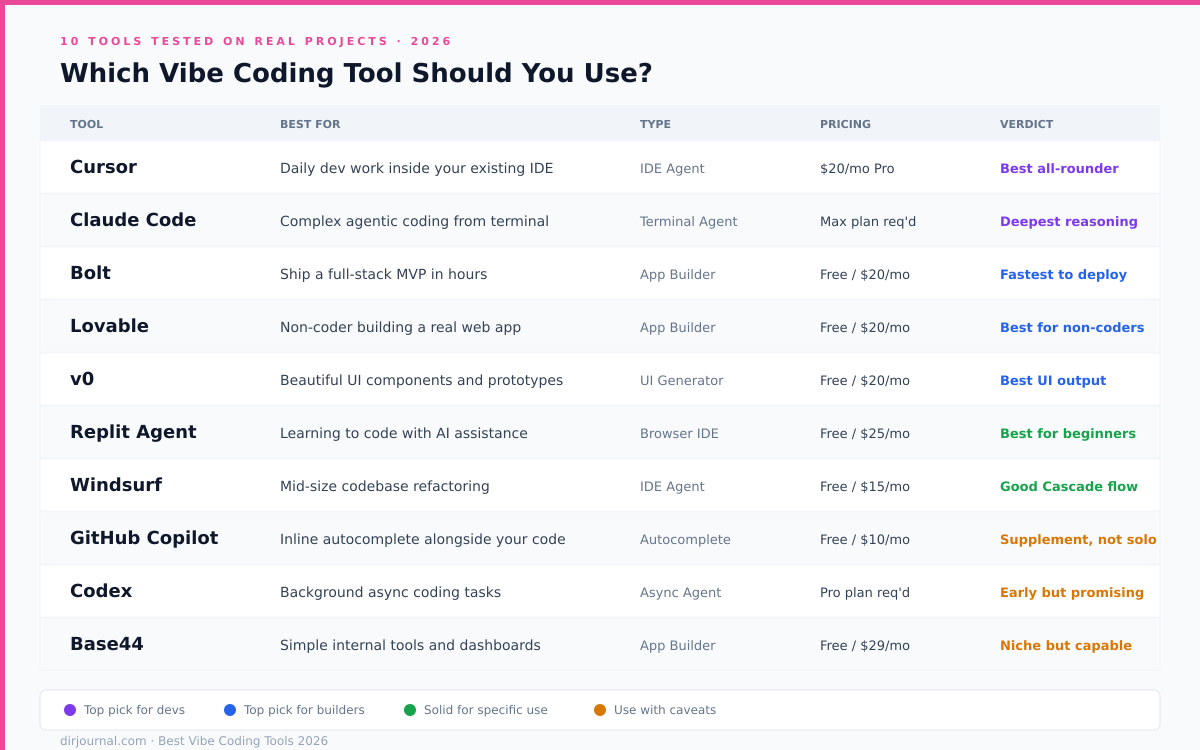
Tool | Best For | Free Tier | Pro Price | Code Export | Backend | Founded | Valuation |
|---|---|---|---|---|---|---|---|
Non-technical founders | 100 chats/mo | $20/mo | GitHub sync | Supabase built-in | 2023 | $6.6B | |
Developers who code daily | 2K completions | $20/mo | Native (it's an IDE) | Any | 2022 | $60B | |
Fastest prototype to deploy | Limited | $20/mo | Download | Node.js in browser | 2024 | N/A (StackBlitz) | |
Learning while building | Free tier | $25/mo | GitHub export | Built-in | 2016 | $9B | |
React UI generation | Free | $20/mo | Copy-paste | Frontend only | 2023 | Part of Vercel | |
Claude Code | Terminal power users | Pay per use | API pricing | Native | Any | 2025 | Part of Anthropic |
Enterprise engineering teams | None | Team/Enterprise | Native | Any | 2023 | $26B | |
Large codebases | Free tier | $15/mo | Native (it's an IDE) | Any | 2021 | Part of Cognition | |
VS Code users who want autocomplete | Free tier | $10/mo | Native | Any | 2021 | Part of Microsoft | |
Open-source terminal coding | Free | Free (bring API key) | Native | Any | 2023 | N/A |

The 3 Categories
Vibe coding tools split into three groups. Picking from the wrong group is the most common mistake people make.
App builders (Lovable, Bolt.new, Replit): You describe an app. The AI builds the entire thing. Frontend, backend, database, deployment. You don't need to know what React is. These are for people who want a finished product from a conversation.
AI IDEs (Cursor, Windsurf/Devin Desktop, GitHub Copilot): You write code alongside an AI partner. The AI suggests, generates, and refactors, but you're in the driver's seat. These are for developers who want to move 3-5x faster, not for people who've never opened a terminal.
Specialist tools (v0, Claude Code, Aider, Devin): Each does one thing extremely well. v0 generates React components. Claude Code runs autonomous coding sessions from the terminal. Devin executes multi-step engineering tasks without supervision. You pick these when you know exactly what you need.
App Builders
1. Lovable
Best for: Non-technical founders building their first web app What I built with it: A client intake form with Supabase backend, Stripe payments, and email notifications
Lovable sits at the top because it balances speed, output quality, and usability better than anything else in the category. After you send your first prompt, the AI sketches out what it plans to build before writing any code. That planning step is the difference between Lovable and tools that just start generating and hope for the best.
The editing workflow sets it apart from Bolt.new and Replit. You can select elements visually, draw annotations on the preview, or leave comments pointing at specific UI components. It feels like giving feedback to a designer, not debugging code.
The tradeoff: Lovable generates React + Supabase. If you need a different stack, you're fighting the tool. The GitHub sync works but merging Lovable-generated commits with human-written code gets messy. And the AI occasionally "refactors" working code while implementing a new feature, breaking things that were fine before the last prompt.
Lovable crossed $400 million ARR by February 2026 with 8 million users and 146 employees. Founded in Stockholm by Anton Osika and Fabian Hedin, it grew from the open-source GPT Engineer project.
Pricing: Free (100 chats/mo) | Starter $20/mo | Pro $50/mo
View Lovable profile on DirJournal
2. Bolt.new
Best for: Getting a prototype deployed in under 30 minutes What I built with it: A project tracker with kanban board and team member assignments
Bolt.new's party trick is speed. It runs Node.js in the browser using StackBlitz's WebContainers technology. No cloud servers. No waiting for builds. You see your app running instantly as the AI generates code. One-click deploy to Netlify when you're happy with it.
The output tends to be rougher than Lovable's. Bolt generates working code fast but doesn't always produce clean, maintainable code. For a prototype you'll throw away after validating an idea, that's fine. For something you plan to build on, expect to refactor.
The editing loop is faster than Lovable's but less precise. You prompt, the AI rewrites, you see the result immediately. No planning preview. No visual selection tools. It's more "rapid fire" and less "careful collaboration."
Built by Eric Simons at StackBlitz. The WebContainers technology that powers Bolt.new is genuinely novel: running a full Node.js server inside a browser tab without any backend infrastructure.
Pricing: Free (limited) | Pro $20/mo | Team pricing available
View Bolt.new profile on DirJournal
3. Replit
Best for: Learning to build software while actually shipping something What I built with it: A personal finance tracker with charts and CSV export
Replit is the most accessible entry point. It runs everything in the browser: editor, terminal, database, hosting, deployment. You can go from "I've never coded" to "I have a live web app" without installing anything.
The AI Agent (now on version 4) converts natural language descriptions into working applications. It's not as polished as Lovable's output and not as fast as Bolt.new's generation. But it's the only tool that teaches you what's happening while it builds. The explanations and code comments help beginners understand what they're looking at.
Replit's founder Amjad Masad targets $1 billion in ARR by end of 2026. The company raised $400 million at a $9 billion valuation in March 2026 from Georgian, Andreessen Horowitz, and Coatue. 50+ million users across 190 countries.
Pricing: Free tier | Replit Core $25/mo | Teams $40/user/mo
View Replit profile on DirJournal
AI IDEs
4. Cursor
Best for: Professional developers who want AI integrated into their daily workflow What I built with it: Production features, bug fixes, and refactors across multiple codebases
Cursor is a fork of VS Code with AI built into the core runtime, not bolted on as an extension. That architectural decision matters. The AI sees your entire codebase, understands function relationships, and makes changes across multiple files simultaneously. GitHub Copilot can't do this because it operates as an extension with limited context.
Agent mode is the standout feature. You describe a task ("add pagination to the user list, update the API endpoint, and add the UI controls") and Cursor plans the changes, edits multiple files, runs the code, and iterates until it works. For experienced developers, this 3-5x's productivity on routine tasks.
Founded in 2022 by four MIT students: Michael Truell, Sualeh Asif, Aman Sanger, and Arvid Lunnemark. In June 2026, SpaceX agreed to acquire Anysphere (Cursor's parent company) for $60 billion. More than 60% of Fortune 500 companies use Cursor.
Pricing: Free (2K completions) | Pro $20/mo | Business $40/user/mo
View Cursor profile on DirJournal
5. Windsurf (now Devin Desktop)
Best for: Working across large, complex codebases What I built with it: Modifications to a 100K+ line Next.js application
Windsurf was Codeium's standalone AI IDE, launched in November 2024. Cognition (the company behind Devin) acquired Codeium in 2025 and rebranded Windsurf to "Devin Desktop" in June 2026. The IDE itself hasn't changed: it's still a VS Code-based editor with Cascade, an agentic coding assistant that maintains context across your entire repository.
Where Cursor excels at multi-file edits within a session, Windsurf/Devin Desktop is stronger at understanding large codebases holistically. It builds a semantic index of your code structure, function relationships, and import chains. For enterprise codebases with hundreds of files, that context depth matters.
The transition to Cognition's umbrella means Windsurf now pairs with Devin (the cloud-based autonomous agent). Use Windsurf locally for interactive development. Hand off larger tasks to Devin in the cloud. The combined platform is targeting enterprise engineering teams.
Pricing: Free tier | Pro $15/mo | Enterprise pricing
View Windsurf profile on DirJournal
6. GitHub Copilot
Best for: Developers who want autocomplete and inline suggestions without switching editors What I built with it: Various features across multiple projects (used as a supplement, not primary tool)
Copilot is the original AI coding assistant, integrated into VS Code, JetBrains, and Neovim. It suggests code as you type, fills in function bodies, writes tests, and answers questions in chat. It's the least disruptive tool on this list: you keep your existing setup and Copilot enhances it.
The limitation is scope. Copilot works at the file level, not the project level. It suggests the next line of code based on the current file and its immediate context. It can't plan multi-file refactors or understand your full codebase architecture the way Cursor and Windsurf can. For autocomplete and inline suggestions, it's excellent. For agentic multi-step tasks, Cursor wins.
Pricing: Free tier (2K completions/mo) | Individual $10/mo | Business $19/user/mo
View GitHub Copilot profile on DirJournal
Specialist Tools
7. V0 by Vercel
Best for: Generating production-ready React UI components from descriptions or images What I built with it: Landing pages, dashboard layouts, form components
v0 does one thing and does it well: you describe a UI (or upload a screenshot) and it generates React components with Tailwind CSS styling. The output is production-ready. You copy the code into your Next.js project and it works.
v0 doesn't build backends. It doesn't handle databases. It doesn't deploy applications. It's a UI generation tool, and that focus is why the output quality is higher than general-purpose vibe coding tools for the specific task of building interfaces.
The typical workflow: prototype the UI in v0, then move the components into Cursor or your existing codebase for backend wiring. This split workflow is more effort than Lovable's all-in-one approach but produces cleaner, more maintainable frontend code.
Pricing: Free | Premium $20/mo
8. Claude Code
Best for: Terminal-native developers who want autonomous coding without a GUI What I built with it: Multi-file refactors, automated testing, deployment scripts, this website
Claude Code runs in your terminal. No IDE. No browser. You describe a task, Claude Code reads your codebase, plans the changes, edits files, runs tests, and commits. It's the most powerful agentic coding tool available but has the steepest learning curve.
What sets it apart: Claude Code can run bash commands, install packages, execute tests, and iterate based on error output. It's not just generating code. It's operating as a developer that happens to live in your terminal. The MCP (Model Context Protocol) integration lets it connect to external services like databases, APIs, and deployment platforms.
Built by Anthropic. Runs on Claude Sonnet and Opus models. Pay-per-use through the Anthropic API or included with Claude Pro/Max subscriptions.
Pricing: Included with Claude Max ($100-200/mo) | API pricing (~$3-15 per million tokens)
9. Devin by Cognition
Best for: Enterprise teams that want an autonomous AI software engineer What it does: Multi-step engineering tasks executed independently with pull request output
Devin is the most ambitious tool on this list. It plans, writes, tests, and ships code autonomously. You assign it a task ("fix bug #342" or "implement the Stripe webhook handler") and it works independently, creating a pull request when it's done. Mercedes-Benz reportedly cut an eight-month modernisation project to eight days using Devin.
It's not a vibe coding tool in the way Lovable or Bolt.new are. You don't sit and iterate with it in real time. You assign tasks and review outputs. It's closer to a junior developer on your team than a coding assistant in your IDE.
Founded in 2023 by Scott Wu (CEO), Steven Hao (CTO), and Walden Yan (CPO). Valued at $26 billion. $492 million in annual revenue. Enterprise customers include Goldman Sachs, Citi, Dell, and the US Army.
Pricing: Team and Enterprise tiers (no public pricing)
View Cognition/Devin profile on DirJournal
10. Aider
Best for: Open-source purists who want a free, terminal-based AI pair programmer What I built with it: Small feature additions and bug fixes across Python and JavaScript projects
Aider is free and open-source. You bring your own API key (OpenAI, Anthropic, or any compatible model) and run it in the terminal. It reads your git repo, makes changes, and commits them with descriptive messages. No subscription. No platform lock-in.
The output quality depends entirely on the model you connect. With Claude Sonnet, Aider produces strong results for focused tasks (fix this bug, add this feature, write tests for this function). With cheaper models, quality drops. It's the most customisable option but requires the most setup.
Pricing: Free (bring your own API key)
View Aider profile on DirJournal
Pick Your Tool: the Decision Flowchart
"I've never coded and I want to build a web app." Start with Lovable. It's the most guided experience with the best balance of speed and output quality.
"I need a prototype deployed by tomorrow." Bolt.new. Fastest path from description to deployed app. Don't worry about code quality. Worry about speed.
"I'm a developer and I want AI to make me faster." Cursor. It's the reference AI IDE. Agent mode handles multi-file changes. The codebase understanding is deeper than anything else.
"I want to learn how software works by building something real." Replit. It explains what it's doing. It runs in the browser. No setup.
"I just need a landing page or dashboard component." v0 by Vercel. Frontend only, but the React output is production-ready.
"I'm a power user who lives in the terminal." Claude Code. Most powerful, steepest learning curve. Aider if you want the free open-source version.
"My enterprise team needs autonomous engineering capacity." Devin. Assign tasks. Review pull requests. Scale engineering output.
What We Tested and How We Ranked
Every tool on this list was tested on real projects over the past 12 months. Ranking criteria: output quality on first generation, ability to iterate without breaking existing code, deployment options, pricing fairness, and how the tool performs on Day 2 (the second feature request, not just the initial build).
We also checked which tools AI engines actually recommend. In our AI Citation Study across 750 queries, Cursor, Lovable, and Replit were the most frequently cited vibe coding tools across Claude, ChatGPT, and Perplexity.
For a deeper explanation of how vibe coding works, the risks, and who should and shouldn't use it, read our What Is Vibe Coding guide.
Browse Vibe Coding Agencies on DirJournal | Browse AI Coding Assistants | Browse AI Developer Tools
Join the DirJournal newsletter
Weekly insights on directories, listings, SEO, and how businesses get found online.
No spam. Unsubscribe anytime.
Found this useful?
Share this article
Recommended for You

Five Sales Tools That Drive Real Profit
Sales tools fall into five categories that each remove non-selling work: sales and marketing…

Free AI Visibility Scanners: 12 Tools That Check Your Brand on ChatGPT, Gemini & Perplexity
An honest comparison of 12 AI visibility scanners — what is actually free, what is paywalled, and…
Related Resources
Looking for verified service providers? Browse our directory categories below — all human-audited and trusted by decision-makers since 2007.