Independent. Human-Curated. Established 2007.
What an AI Receptionist Actually Does for a Small Business (and When It Should Hand Off to a Human)
Journalist, copywriter and content strategist · founder of The Journal Prompts Hub.
Key Takeaways
- 1An AI receptionist understands ordinary speech, asks follow-up questions and can write to connected software, where a traditional IVR relies on keypad menus and fixed routing.
- 2Direct booking needs calendar write access. A message-only service just texts a booking link, and both get sold under the same label.
- 3Handoff rules should cover unclear requests, distressed callers, payment or identity issues, medical or mental health crises, real-world hazards and any caller who asks for a person.
- 4Connecting HubSpot, Salesforce or a field-service tool like Jobber or ServiceTitan adds caller context, but customer-specific details still need an identity check before they're shared.
- 5Published entry plans checked October 26, 2026 range from Dialzara Business Lite at $29 a month to Smith.ai Pro at $150 a month for 75 calls.
- 6Call-recording consent rules differ by state, and some states require consent from every party on the call.
An AI receptionist answers incoming business calls, identifies what the caller needs, captures contact information, books appointments and routes urgent requests. Unlike voicemail or a standard phone menu, it can ask follow-up questions and act on information from connected software, although its abilities depend on the service and configuration.
For a plumber on a job or a law office during consultations, that means routine calls need not wait for a staff member. The shift is part of a wider discussion about how AI is changing outsourced work, but a phone agent still needs clear limits and human backup.
How is an AI Receptionist Different From Traditional IVR?
Interactive voice response (IVR) systems usually ask callers to press a key or choose from a short set of spoken options. An AI receptionist interprets a request expressed in ordinary language, asks for missing details, and sends information to another application.
| Feature | Traditional IVR | AI receptionist |
|---|---|---|
| Communication | Keypad or predefined commands | Conversational speech |
| Call flow | Fixed menu and routing | Adaptive questions within configured rules |
| Data capture | Basic selections and caller details | Call context and structured fields |
| Connections | Primarily call routing | CRM, calendar and API actions |
| After-call record | Typically a call log | Transcript and summary |
The distinction is functional rather than absolute. An advanced IVR can connect to databases, while an AI system without the needed permissions only takes messages. Businesses should test the actions the service can complete rather than rely on its label.
What Does an Effective AI Answering Service Do?
Turns a Conversation Into Usable Customer Data
Automatic speech recognition converts a caller’s speech into text. Language models then classify the request and extract details such as name, address, preferred service, urgency and callback number; the business sets rules to confirm important fields before saving them.
A service company defines an intake form with service area, property type, problem description and availability. The AI can populate those fields, assign a call outcome such as “new booking” or “needs callback,” and deliver a summary rather than an unstructured voicemail.
Checks Availability and Completes Approved Actions
When scheduling software is connected with write access, a receptionist checks open times and creates an appointment. A message-only service sends a scheduling link or flags the call for staff to book later; these are materially different capabilities.
Consider a plumbing company receiving a call at 9:40 PM about a leaking pipe. The AI asks for the property location, the type of leak and whether water is actively escaping; if the caller describes a burst pipe, predefined rules alert the on-call plumber rather than treating it as a routine appointment.
If the issue can safely wait, the AI checks the connected calendar, offers the next available service slot, books the accepted time, texts a confirmation and posts a concise summary to the owner. Each step requires the relevant calendar, messaging and notification permissions, so a buyer should verify the complete sequence in a trial call.
How Does an AI Receptionist Help a Small Business?
A configured AI service answers calls when staff members are with customers, driving or away from the office. Some platforms support concurrent conversations, but capacity, response quality and fallback behavior vary by provider and plan.
After-hours availability helps capture requests that would otherwise become voicemail. It does not mean the business has round-the-clock service technicians: the greeting and booking rules should distinguish between a staffed emergency line and a next-business-day callback.
A business still needs a person to investigate complicated requests, follow up with a longstanding customer, or correct a booking. Virtual assistant agencies provide human administrative coverage, while an AI receptionist is most useful for repeatable call intake and scheduling.
The AI layer is also separate from the phone service itself. A business comparing numbers, call forwarding and mobile extensions can review business phone services before deciding whether to add a receptionist to an existing line.
When Should It Hand Off to a Human?
A useful receptionist knows its scope. Escalation should be based on written rules and a tested destination, with the caller’s consent and pertinent context passed along when permitted.
- The caller’s intent remains unclear after reasonable clarification, or the request falls outside approved answers and actions.
- The caller is angry, distressed or needs a sensitive conversation with a person.
- The call involves identity verification, a payment dispute, financial details or another sensitive transaction that the AI is not authorized to handle.
- A high-priority client needs negotiation, an exception or a decision reserved for staff.
- A caller describes a mental health crisis, possible medical emergency or requests medical judgment. The system should not attempt diagnosis or treatment.
- The caller explicitly requests a person or repeated attempts to resolve the issue fail.
- A real-world hazard requires immediate response, such as a burst pipe threatening a property or a fire risk.
- The request is suspicious, account authentication fails, or the caller asks for an unusual change to sensitive information.
A handoff can transfer the live call to a staffed line, notify an on-call employee or record an urgent callback request. For immediate danger, the system should direct callers to appropriate emergency services rather than imply that an unstaffed inbox provides emergency response.
Why Do CRM and Calendar Connections Matter?
Connecting customer records and schedules lets the AI avoid asking for information already available to authorized staff. A CRM such as HubSpot or Salesforce holds contact history, while Google Calendar, Microsoft Outlook, Calendly and Cal.com provide appointment availability.
Specialized firms often schedule work in Jobber, Housecall Pro or ServiceTitan. Buyers need to distinguish a listed integration from verified two-way booking: a connection that creates a lead may not reserve a job, assign a technician or prevent duplicate appointments.
Teams evaluating broader service operations can also compare AI-assisted customer support providers. These tools handle tickets, chat and email as well as incoming calls, but they do not all share the same records or permissions.
| Without customer context | With authorized customer context |
|---|---|
| “Which invoice is this about? What happened last time?” | “Is this about invoice #1004 and the payment discrepancy reported last week?” |
| Staff must locate the earlier conversation and identify the next step. | The system references the existing case and can route the caller to the assigned staff member. |
Context should not become permission to reveal private details to anyone who calls. The system needs a suitable identity check before disclosing invoices, appointments or other customer-specific information.
What to Check Before You Buy
Start with a month of actual call volume and calculate cost under three pricing models: per minute, per answered call and flat monthly. Check included usage, overage rates, spam-call treatment, setup fees, minimum commitments and whether transferred calls incur another charge.
Ask for a live demonstration using the business’s actual calendar. Google Calendar and Outlook are different from Calendly and Cal.com, and field-service platforms such as Jobber, Housecall Pro and ServiceTitan may require a higher plan or a separate connector. A system that only texts a booking link should not be sold as direct appointment booking.
Test human fallback by asking for a person and by presenting an urgent, unfamiliar request. Determine whether the vendor supplies live agents or only transfers calls to the business, what happens when nobody answers, and whether escalation carries additional fees.
Review call recordings and transcripts before enabling them. Ask where they are stored, who can access them, how long they remain available, how deletion works, and whether the service offers configurable recording notices; consent requirements differ by state, including states requiring consent from all parties.
Confirm the number arrangement: the business forwards an existing line, ports its number, or uses a new vendor number. Ask who owns the number at cancellation, whether forwarding costs extra and how calls route during an outage.
Match the software to the work. Home-service firms need dispatch rules, while dental offices need careful scheduling and patient-data safeguards. Generic reception products require additional setup for specialized work.
Published Entry-Plan Examples
| Service | Published starting plan | Billing basis | Calendar capability |
|---|---|---|---|
| Smith.ai | Pro: $150/month, 75 calls | Per call; $2.50 per extra call | Calendly; Housecall Pro and ServiceTitan listed |
| Goodcall | Starter: $79/month | 100 unique customers included; $0.50 per extra customer; unlimited minutes | Google Calendar listed for GC4 |
| Rosie | Professional: $49/month | Monthly with 250 minutes | Booking links on Professional; direct booking on Scale ($149/month) |
| Dialzara | Business Lite: $29/month | 60 minutes included; $0.48 per extra minute | Zapier/Make connections; verify live calendar booking |
Prices and feature descriptions checked October 26, 2026 on the providers’ published pages. Prices exclude taxes and possible add-ons; confirm the selected plan before purchase.
A purchase test should include a normal booking, a failed calendar connection, an unclear request and an after-hours emergency. The useful result is a traceable call record showing exactly which actions succeeded, which failed and who received the fallback.
Frequently Asked Questions
What does an AI receptionist do?
How is an AI receptionist different from an IVR phone menu?
Can an AI receptionist book appointments?
When should an AI receptionist transfer a call to a person?
How much does an AI receptionist cost?
What should I test before buying an AI receptionist?
Join the DirJournal newsletter
Weekly insights on directories, listings, SEO, and how businesses get found online.
No spam. Unsubscribe anytime.
Found this useful?
Share this article
Recommended for You
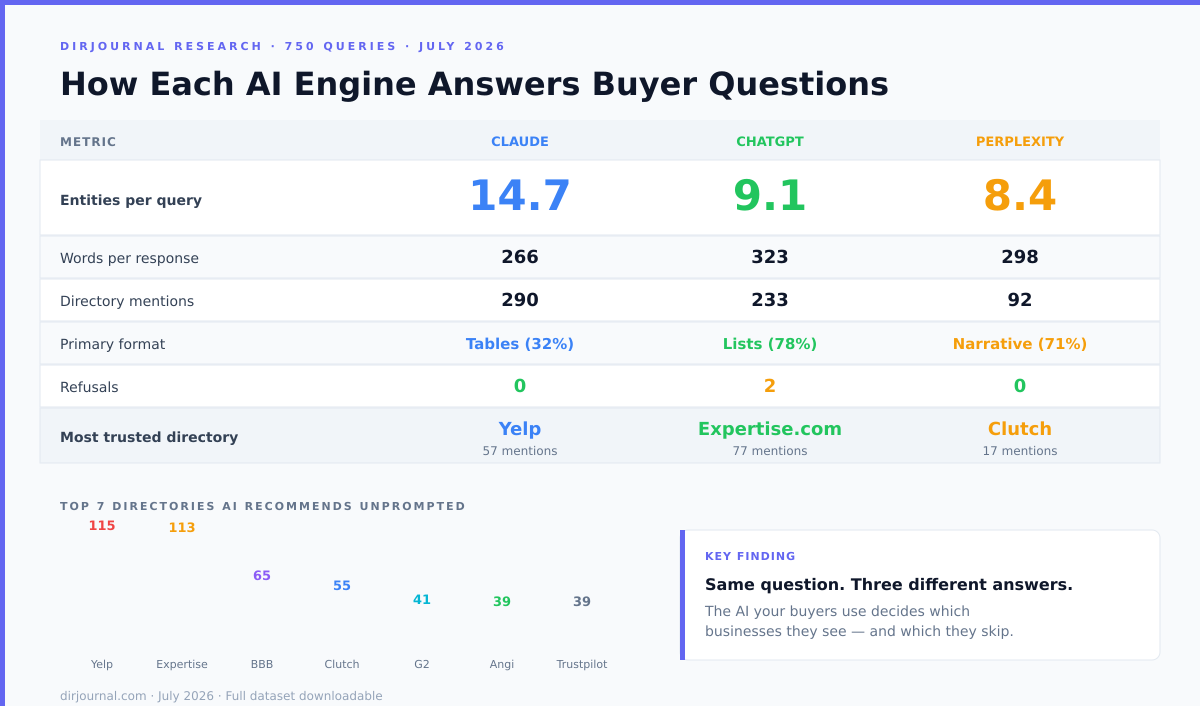
Claude vs ChatGPT vs Perplexity: How Each AI Engine Answers Buyer Questions Differently
Claude writes comparison tables and names 14.7 businesses per query. ChatGPT writes numbered lists…
Why AI Visibility Now Depends on Human-Curated Directories, Not Backlinks
Why AI engines like Google AI Overviews, ChatGPT, and Perplexity prioritize human-curated…
160+ Claude Prompt Shortcuts: The Working List for 2026
Most Claude prompt shortcuts you've seen target consumer use cases. Here are 160 organised by what…
Related Resources
Looking for verified service providers? Browse our directory categories below — all human-audited and trusted by decision-makers since 2007.